Mcp Link Convert Any Openapi V3 Api To Mcp Server

Convert Any OpenAPI V3 API to MCP Server
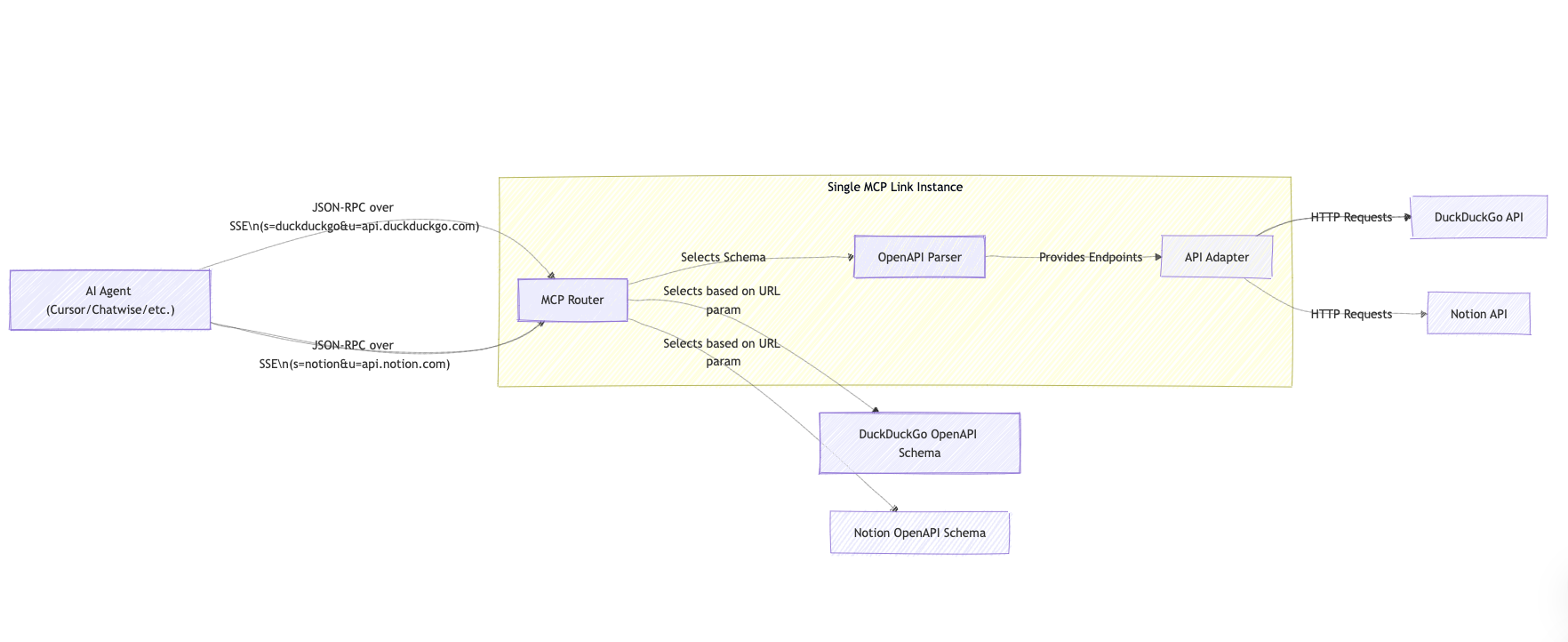
Overview
What is MCP-Link?
MCP-Link is an innovative tool designed to convert any OpenAPI V3 API into a fully functional MCP (Microservices Communication Protocol) server. This allows developers to easily create and manage microservices, enhancing the scalability and efficiency of their applications. By leveraging the power of OpenAPI specifications, MCP-Link simplifies the process of API integration and management.
Features of MCP-Link
- OpenAPI V3 Compatibility: MCP-Link supports the latest OpenAPI V3 specifications, ensuring that developers can work with modern APIs seamlessly.
- Easy Conversion: The tool automates the conversion process, allowing users to transform their OpenAPI definitions into an MCP server with minimal effort.
- User-Friendly Interface: MCP-Link provides an intuitive interface that makes it easy for developers to navigate and utilize its features effectively.
- Scalability: Built with scalability in mind, MCP-Link allows developers to manage multiple microservices without compromising performance.
- Documentation Generation: Automatically generates comprehensive documentation for the created MCP server, making it easier for teams to understand and use the API.
How to Use MCP-Link
- Access the Tool: Visit the MCP-Link website to access the tool.
- Upload OpenAPI Specification: Start by uploading your OpenAPI V3 specification file. MCP-Link will read the file and prepare for conversion.
- Configure Settings: Adjust any necessary settings to tailor the MCP server to your specific needs.
- Convert to MCP Server: Initiate the conversion process. MCP-Link will generate the MCP server based on your OpenAPI definition.
- Deploy and Manage: Once the conversion is complete, deploy your MCP server and manage it through the provided interface.
Frequently Asked Questions
Q1: What is OpenAPI V3?
A1: OpenAPI V3 is a specification for building APIs that allows developers to describe their API's endpoints, request/response formats, and authentication methods in a standardized way.
Q2: Can MCP-Link handle complex APIs?
A2: Yes, MCP-Link is designed to handle complex APIs, making it suitable for a wide range of applications and services.
Q3: Is there a cost associated with using MCP-Link?
A3: MCP-Link is currently available as a public tool, and users can access its features without any cost.
Q4: What programming languages does MCP-Link support?
A4: MCP-Link is language-agnostic, meaning it can be used with any programming language that can interact with HTTP APIs.
Q5: How can I contribute to MCP-Link?
A5: Contributions are welcome! You can visit the MCP-Link repository on GitHub to report issues, suggest features, or submit pull requests.
Details
Server Config
{
  "mcpServers": {
    "mcp-link": {
      "command": "docker",
      "args": [
        "run",
        "-i",
        "--rm",
        "ghcr.io/metorial/mcp-container--automation-ai-labs--mcp-link--mcp-link",
        "./out"
      ],
      "env": {}
    }
  }
}


